
Inventory
Inventory by SKU and warehouse
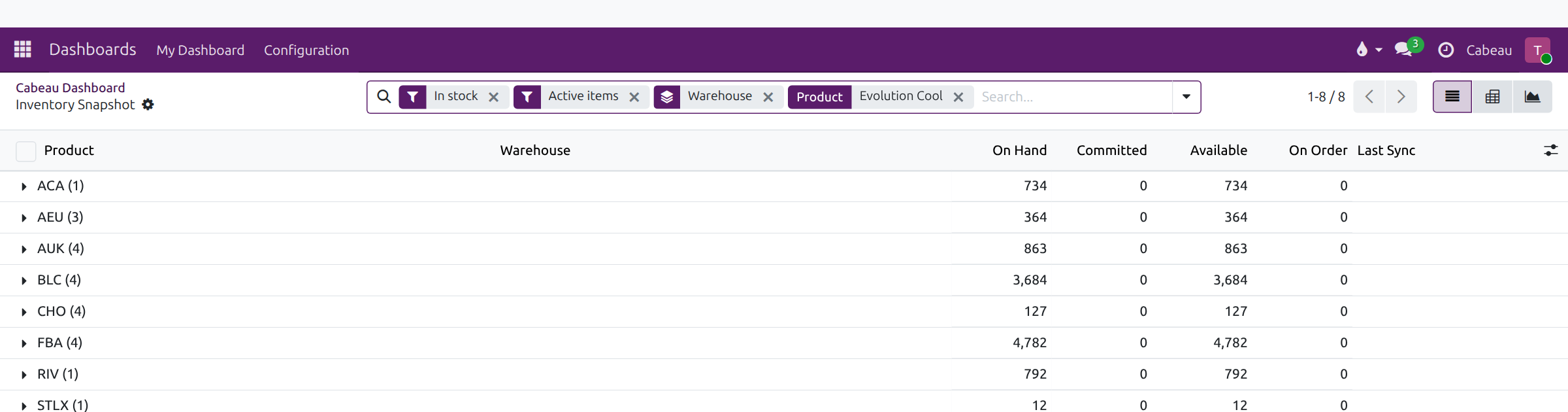
Section titled “Inventory by SKU and warehouse”Inventory on your dashboard opens the inventory snapshot, grouped by warehouse and 3PL. Every role can read it.
| Column | Meaning |
|---|---|
| On Hand | Physical stock at the location, per NetSuite, including units committed to orders not yet shipped |
| Committed | Held for open orders |
| Available | What you can still sell |
| On Order | On the way from open purchase or transfer orders |
| Last Sync | When the row last came from NetSuite |
Open a warehouse row for its products, or search a product name to see it in every warehouse that holds it.
Transcript
- This workflow shows how to check stock for a product in each warehouse.
- Select Inventory on your dashboard. The snapshot opens on products in stock, grouped by warehouse.
- Each warehouse row shows its totals. Open one to see every product held there.
- On Hand is the physical stock in the warehouse, including units already committed to orders not yet shipped.
- Committed is held for open orders. Available is what you can still sell. On Order is stock on the way.
- Last Sync shows when the figure last came from NetSuite. Check it before you quote stock to a customer.
- Type a product name in the search box to see that product across every warehouse.
- That is how to check stock by warehouse.
Check Last Sync before you quote stock to a customer.